f41da0dfdd
One-shot migration over the stored config and TLS rows, guarded by a setting so it runs once: - dns.independent_cache is dropped (1.14 reads it only to warn; the value is never passed to the DNS client) - experimental.cache_file.store_rdrc becomes store_dns - route.rule_set[].download_detour becomes the http_client 1.14 builds for it - inline tls.acme becomes tls.certificate_provider with type "acme" Legacy DNS address filters and the `strategy` DNS rule action are NOT migrated automatically. Converting them means inserting evaluate rules and reordering, which changes how names resolve, so they are logged with the upstream migration link for the operator to handle. Tests cover each rewrite, that unrelated options survive, that a config with nothing to migrate is left byte-identical, and that the migrated shapes build a box with no deprecation warning. |
||
|---|---|---|
| .github | ||
| api | ||
| app | ||
| cmd | ||
| config | ||
| core | ||
| cronjob | ||
| database | ||
| frontend@6071c9e117 | ||
| logger | ||
| middleware | ||
| network | ||
| service | ||
| sub | ||
| util | ||
| web | ||
| windows | ||
| .dockerignore | ||
| .gitignore | ||
| .gitmodules | ||
| build.sh | ||
| CONTRIBUTING.md | ||
| docker-build-test.sh | ||
| docker-compose.yml | ||
| Dockerfile | ||
| Dockerfile.frontend-artifact | ||
| entrypoint.sh | ||
| go.mod | ||
| go.sum | ||
| install.sh | ||
| LICENSE | ||
| main.go | ||
| README.md | ||
| runSUI.sh | ||
| s-ui.service | ||
| s-ui.sh | ||
S-UI
An Advanced Web Panel • Built on SagerNet/Sing-Box




Disclaimer: This project is only for personal learning and communication, please do not use it for illegal purposes, please do not use it in a production environment
If you think this project is helpful to you, you may wish to give a🌟
Want to contribute? See CONTRIBUTING.md for development setup, coding conventions, testing, and the pull request process.


Quick Overview
| Features | Enable? |
|---|---|
| Multi-Protocol | ✔️ |
| Multi-Language | ✔️ |
| Multi-Client/Inbound | ✔️ |
| Advanced Traffic Routing Interface | ✔️ |
| Client & Traffic & System Status | ✔️ |
| Subscription Link (link/json/clash + info) | ✔️ |
| Dark/Light Theme | ✔️ |
| API Interface | ✔️ |
Supported Platforms
| Platform | Architecture | Status |
|---|---|---|
| Linux | amd64, arm64, armv7, armv6, armv5, 386, s390x | ✅ Supported |
| Windows | amd64, 386, arm64 | ✅ Supported |
| macOS | amd64, arm64 | 🚧 Experimental |
Screenshots

API Documentation
Default Installation Information
- Panel Port: 2095
- Panel Path: /app/
- Subscription Port: 2096
- Subscription Path: /sub/
- User/Password: admin
Install & Upgrade to Latest Version
Linux/macOS
bash <(curl -Ls https://raw.githubusercontent.com/alireza0/s-ui/master/install.sh)
Installer language
The installer is available in the same six languages as the panel: en (default), fa, ru, vi, zhcn, zhtw. Choose one with the SUI_LANG environment variable (when unset, your system $LANG is used as a hint):
SUI_LANG=fa bash <(curl -Ls https://raw.githubusercontent.com/alireza0/s-ui/master/install.sh)
Alpine Linux
Alpine uses apk and OpenRC instead of apt/systemd. The install script detects Alpine automatically and sets up an OpenRC service. Since Alpine has no bash by default, install it first:
apk add bash
bash <(curl -Ls https://raw.githubusercontent.com/alireza0/s-ui/master/install.sh)
Manage the service with OpenRC: rc-service s-ui start|stop|restart and rc-update add s-ui default.
Windows
- Download the latest Windows release from GitHub Releases
- Extract the ZIP file
- Run
install-windows.batas Administrator - Follow the installation wizard
Install legacy Version
Step 1: To install your desired legacy version, add the version to the end of the installation command. e.g., ver v1.5.0:
VERSION=v1.5.0 && bash <(curl -Ls https://raw.githubusercontent.com/alireza0/s-ui/$VERSION/install.sh) $VERSION
Manual installation
Linux/macOS
- Get the latest version of S-UI based on your OS/Architecture from GitHub: https://github.com/alireza0/s-ui/releases/latest
- OPTIONAL Get the latest version of
s-ui.shhttps://raw.githubusercontent.com/alireza0/s-ui/master/s-ui.sh - OPTIONAL Copy
s-ui.shto /usr/bin/ and runchmod +x /usr/bin/s-ui. - Extract s-ui tar.gz file to a directory of your choice and navigate to the directory where you extracted the tar.gz file.
- Copy *.service files to /etc/systemd/system/ and run
systemctl daemon-reload. - Enable autostart and start S-UI service using
systemctl enable s-ui --now - Start sing-box service using
systemctl enable sing-box --now
Windows
- Get the latest Windows version from GitHub: https://github.com/alireza0/s-ui/releases/latest
- Download the appropriate Windows package (e.g.,
s-ui-windows-amd64.zip) - Extract the ZIP file to a directory of your choice
- Run
install-windows.batas Administrator - Follow the installation wizard
- Access the panel at http://localhost:2095/app
Uninstall S-UI
systemd
sudo -i

systemctl disable s-ui  --now

rm -f /etc/systemd/system/sing-box.service
systemctl daemon-reload

rm -fr /usr/local/s-ui
rm /usr/bin/s-ui
Alpine (OpenRC)
rc-service s-ui stop
rc-update del s-ui default
rm -f /etc/init.d/s-ui

rm -fr /usr/local/s-ui
rm /usr/bin/s-ui
Install using Docker
Click for details
Usage
Step 1: Install Docker
curl -fsSL https://get.docker.com | sh
Step 2: Install S-UI
Docker compose method
mkdir s-ui && cd s-ui
wget -q https://raw.githubusercontent.com/alireza0/s-ui/master/docker-compose.yml
docker compose up -d
Use docker
mkdir s-ui && cd s-ui
docker run -itd \
    -p 2095:2095 -p 2096:2096 -p 443:443 -p 80:80 \
    -v $PWD/db/:/app/db/ \
    -v $PWD/cert/:/root/cert/ \
    --name s-ui --restart=unless-stopped \
    alireza7/s-ui:latest
Build your own image
git clone https://github.com/alireza0/s-ui
git submodule update --init --recursive
docker build -t s-ui .
Manual run ( contribution )
Click for details
Build and run whole project
./runSUI.sh
Clone the repository
# clone repository
git clone https://github.com/alireza0/s-ui
# clone submodules
git submodule update --init --recursive
- Frontend
Visit s-ui-frontend for frontend code
- Backend
Please build frontend once before!
To build backend:
# remove old frontend compiled files
rm -fr web/html/*
# apply new frontend compiled files
cp -R frontend/dist/ web/html/
# build
go build -o sui main.go
To run backend (from root folder of repository):
./sui
Languages
- English
- Farsi
- Vietnamese
- Chinese (Simplified)
- Chinese (Traditional)
- Russian
Features
- Supported protocols:
- General: Mixed, SOCKS, HTTP, HTTPS, Direct, Redirect, TProxy
- V2Ray based: VLESS, VMess, Trojan, Shadowsocks
- Other protocols: ShadowTLS, Hysteria, Hysteria2, Naive, TUIC
- Supports XTLS protocols
- An advanced interface for routing traffic, incorporating PROXY Protocol, External, and Transparent Proxy, SSL Certificate, and Port
- An advanced interface for inbound and outbound configuration
- Clients’ traffic cap and expiration date
- Displays online clients, inbounds and outbounds with traffic statistics, and system status monitoring
- Subscription service with ability to add external links and subscription
- HTTPS for secure access to the web panel and subscription service (self-provided domain + SSL certificate)
- Dark/Light theme
Environment Variables
Click for details
Usage
| Variable | Type | Default |
|---|---|---|
| SUI_LOG_LEVEL | "debug" | "info" | "warn" | "error" |
"info" |
| SUI_DEBUG | boolean |
false |
| SUI_BIN_FOLDER | string |
"bin" |
| SUI_DB_FOLDER | string |
"db" |
| SINGBOX_API | string |
- |
SSL Certificate
Click for details
Certbot
snap install core; snap refresh core
snap install --classic certbot
ln -s /snap/bin/certbot /usr/bin/certbot

certbot certonly --standalone --register-unsafely-without-email --non-interactive --agree-tos -d <Your Domain Name>
Third-party Projects
Community-made projects built around S-UI. These are not affiliated with or maintained by S-UI — use them at your own discretion:
- itning/reset-s-ui-traffic — periodic traffic reset for all users
- zqh2333/s-ui-traffic-reset — traffic reset tool
- Sownix21/SUI-Bot - telegram bot
Building something on top of S-UI (a Telegram bot, monitoring, automation, ...)? Open an issue/PR to get it listed here.
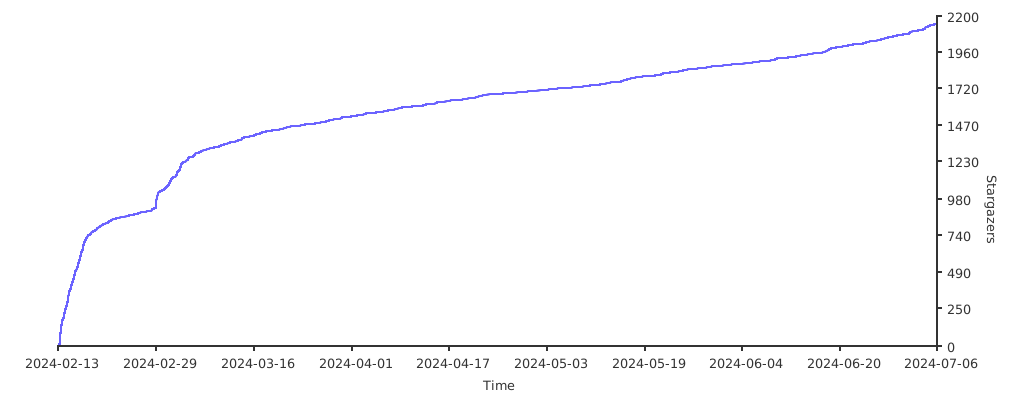
Stargazers over Time